How to Close Your FAB Bank Account 2026: Online, App, and Branch Methods


 May 11, 2026 3:20 pm

If you want to close your FAB bank account, the process in 2026 has become simpler thanks to online options and the FAB Mobile app. First Abu Dhabi Bank (FAB) allows many customers to close a personal account from home, through the app, or by visiting a local branch, depending on the account type and your location in the UAE.
Before You Close Your FAB Account
Before closing your FAB bank account, it is important to prepare so that you avoid charges, delays, or security issues.
1. Check Your Balance and Transactions
- Make sure your account balance is zero or fully transferred.
- Stop any standing instructions, recurring payments, or auto‑debits (bills, subscriptions, salary links).
- Confirm there are no pending transactions or in‑progress transfers.
2. Download and Back Up Your Documents
- Download a recent account statement or keep savings / current account proof in PDF or print.
- Save a copy of your passbook details or key transactions for your records.
3. Keep Important Details Handy
- Emirates ID and passport (or residence‑permit details).
- Account number and IBAN.
- Updated phone number and email linked to your account.
Closing a FAB bank account requires you to verify your identity, so keep these ready.
How to Close Your FAB Bank Account Online?
If you have internet banking access, you can often close your FAB bank account through the FABeAccess portal without visiting a branch.
Step 1: Log In to FABeAccess
- Visit the FAB online banking portal in the UAE and sign in with your username and password.
- Enter any OTP or verification code sent to your phone.
Step 2: Request Account Closure
- From the dashboard, go to Customer Service or Account Services.
- Look for an option like “Close Account” or “Account Closure Request.”
- If you don’t see it clearly, use the support chat or help section for guidance.
Step 3: Fill the Closure Form
- Complete the FAB account‑closure form online, entering:
- Your account type (savings or current).
- Closure reason.
- Confirmation of remaining balance.
- Agree to the terms and submit the request.
Step 4: Track Your Closure Status
- You will receive a reference number after submitting the request.
- You can later track your account‑closure status in the “Requests” or “History” section of your FAB online banking.
Many personal accounts are processed within a few working days when the balance is zero and there are no pending issues.
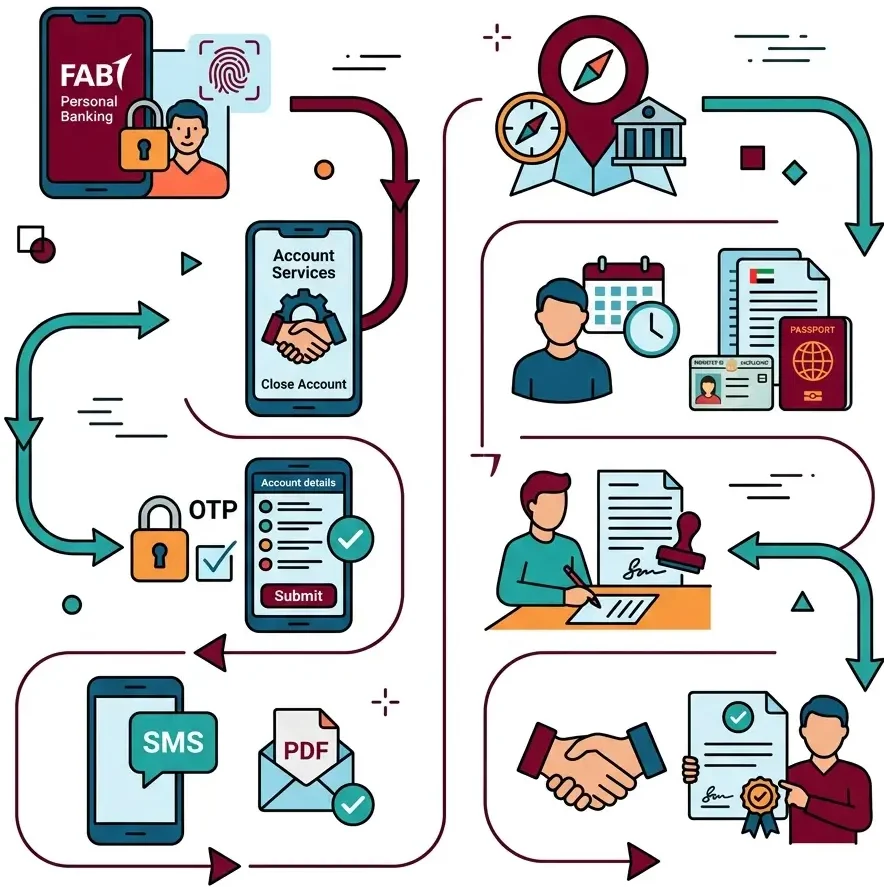
How to Close FAB Bank Account Through the App
If you prefer mobile access, you can close your FAB bank account through the FAB Mobile app (FAB Personal Banking).
Step 1: Open the FAB Mobile App
- Open the FAB Mobile app and log in with your card details, Emirates ID, or registered phone number.
- Complete any face‑scan or OTP verification required.
Step 2: Go to Account Services
- From the home screen, tap “More” or “Help & Support.”
- Look for options like “Close Account” or “Account Closure Request.”
Step 3: Confirm and Submit
- Select the account you want to close.
- Review the details and confirm that the balance is zero and no pending transactions exist.
- Submit the request with your biometric or OTP confirmation.
Step 4: Wait for Confirmation
- FAB usually sends a confirmation via SMS or in‑app message once the closure is approved.
- You may also receive a PDF confirmation email.
This app‑based method is convenient for simple savings or current accounts with no linked loans or complex services.
How to Close Your FAB Bank Account at a Branch?
If you have a business account, joint account, loan, or complex products, you may need to visit a FAB branch to close your FAB bank account.
Step 1: Find the Nearest FAB Branch
- Use the branch‑locator on the FAB website or in the FAB app to find the nearest FAB branch.
- You can filter by city or mall (for example, Dubai Mall, Abu Dhabi Corniche).
Step 2: Book an Appointment (Optional)
- Many FAB branches allow you to book an appointment online or through the app to reduce waiting time.
- Bring your Emirates ID, passport, and account documents.
Step 3: Fill the FAB Account‑Closure Form
- Tell the teller you wish to close your FAB savings account or linked account.
- Staff will give you a FAB account‑closure form to fill out.
- Confirm that your balance is zero and that no pending services are active.
Step 4: Get Written Confirmation
- Ask for written confirmation or a closure‑acknowledgment receipt.
- Keep this for your records, especially if you plan to close other linked cards or services later.
How to Close a FAB Savings or Debit‑Linked Account
Sometimes you want to close your FAB savings account or linked debit account without affecting other services.

FAB Savings Account
- If your balance is zero, you can usually close your FAB savings account through the online portal or app, same as a regular account.
- If you hold recurring deposits, rewards, or certificates of deposit, contact FAB customer service first to confirm terms and any early‑withdrawal conditions.
FAB Debit‑Linked Account
- If your FAB debit card is linked to your account, you can choose to:
- Block the debit card only, keeping the account open.
- Close the account completely, which usually cancels the linked debit card automatically.
For card‑only issues, use the FAB app under Cards to block or freeze the debit card without closing the account.
FAB Account Closure Fees and Charges
FAB usually charges a small fee if you close your bank account within a short period after opening it. Exact FAB account‑closure fees can change, so it’s best to check the latest schedule on the FAB website or consult customer support.
Some common fee patterns (illustrative, not guaranteed):
- Early closure (within a few months of opening): may have a standard closure fee.
- No fee in many cases if the account has been open for a reasonable time and complies with all terms.
- Dormant‑account charges may apply if an account is unused for a long time before closure.
Always:
- Read the fee‑schedule section under “Fees and Charges” on the FAB site.
- Ask a FAB representative for a clear breakdown before closing.
What Happens After You Close Your FAB Bank Account?
Once your FAB bank account is closed:
- FAB usually notifies you by email or SMS and removes your active access.
- Any linked services or mandates (like salary, automatic payments, or direct debits) should be updated or stopped.
- Your balance, if any, is transferred or cleared as per your instructions.
If you later decide you need another account, you can open a new FAB account and follow the standard onboarding process, including KYC checks and documentation.
Customer Support and Safety Tips
1. Official FAB Support Contacts
- General customer service: Use the FAB UAE phone line or online chat on the official FAB site.
- Issuance concerns or suspicious activity: Contact the FAB fraud‑reporting line or email official FAB‑support channels as listed on the website.
- Mobile‑app help: Use the “Help & Support” section inside the FAB Mobile app.
Always use only official channels for FAB bank account login, closure, or support.
2. Safety and Privacy Tips
- Do not share your FAB account details, ATM PIN, or OTP with anyone.
- If someone claims to be FAB support and asks for money or ID, treat it as suspicious and verify through official contacts.
- Regularly check your account activity before requesting closure to avoid surprises.
FAQs About Closing Your FAB Bank Account
How do I close my FAB bank account online?
You can usually submit a FAB account‑closure request through the FABeAccess online banking portal if you have internet banking and the balance is zero. After submitting, track your request and wait for confirmation.
Can I close my FAB bank account through the app?
Yes, if you have the FAB Mobile app, you can request to close your account from the “Help & Support” or “Account Services” section. After approval, you will receive a confirmation via app or email.
What is the FAB account‑closure fee?
FAB may apply a small fee for early closure, but many closures are free if the account has been open for a reasonable time. Check the latest FAB fees schedule or ask customer support for exact rates.
How to close a FAB savings account?
You can close a FAB savings account through the online portal, app, or branch, similar to a regular account, if your balance is zero and no linked products are active. If you have special savings plans, contact FAB first.
How to close a FAB debit account?
A FAB debit card is usually cancelled automatically when you close the linked account, or you can block or freeze the card only in the app. For card‑only issues, use the Cards section of the app.
Is there a difference between closing an account online vs at a branch?
In most cases, the process is similar, but branch visits are needed for complex accounts, business accounts, or joint accounts. Always confirm specific requirements with FAB.
Can I reopen a closed FAB bank account later?
No, once closed, a FAB bank account number is deactivated. You can, however, open a new account and follow the standard FAB opening process, including KYC and document checks.

Conclusion
If you want to close your FAB bank account, use the official FAB website, app, or branch, keep your balance zero, stop all auto‑debits, and follow FAB’s identity and safety rules. Always confirm the latest closure steps and fees directly with FAB before proceeding.