Ratibi Card Salary Check Online: Quick & Easy Balance Inquiry Guide
Getting paid on time matters, and knowing your balance should never be a hassle. Whether you just received your salary or simply want to confirm your funds before a purchase, checking your Ratibi card balance takes less than a minute once you know the right method.
This guide covers every available way to check your Ratibi card balance, online and offline, along with everything else you need to know about using the card confidently day to day.
What is the Ratibi Card?
First Abu Dhabi Bank (FAB) issues the Ratibi card as a prepaid salary card for employees earning up to AED 5,000 per month. The biggest advantage is straightforward: no bank account is required. Employers transfer monthly wages directly onto the card, keeping the payment process smooth, secure, and fully WPS compliant.
The card runs on Visa and Mastercard networks, which means global acceptance is built in from day one. As a cardholder, you can:
- Make ATM withdrawals locally and internationally
- Shop at 5,000+ stores across the UAE for cashless purchases
- Pay utility bills including Etisalat, du, Salik, and Mawaqif
- Make online purchases from international websites
- Send money to 200+ countries through Payit
- Book hotels, flights, and subscribe to streaming services
Since spending is limited to the loaded amount with no overdraft possible, budget control happens naturally without any extra effort.
Easy Ways to Ratibi Card Salary Check
Both online and offline options are available depending on your situation. Here is a full comparison:
| Method | Online/Offline | Speed | Requirement |
|---|---|---|---|
| PPC Inquiry (Magnati) | Online | Instant | Card ID & last 2 digits |
| FAB Mobile App | Online | Seconds | Login credentials & mobile app |
| FAB Online Banking | Online | Seconds | FAB account login |
| Payit Wallet App | Online | Seconds | Ratibi card & Emirates ID |
| WhatsApp Banking | Online | Instant | +971 50 396 6060 & OTP |
| SMS Banking | Offline | 1–3 min | UAE registered mobile number |
| ATM | Offline | 1–2 min | Ratibi card & PIN |
| FAB Branch Visit | Offline | Depends | Ratibi card & Emirates ID |
| Telephone Banking | Offline | 3–5 min | Ratibi card & mobile phone |
Check Ratibi Card Balance via PPC Inquiry (Magnati)
The Magnati PPC Inquiry portal is the fastest online method and requires zero registration. It works on any device with internet access.
- Open your browser and visit ppc.magnati.com
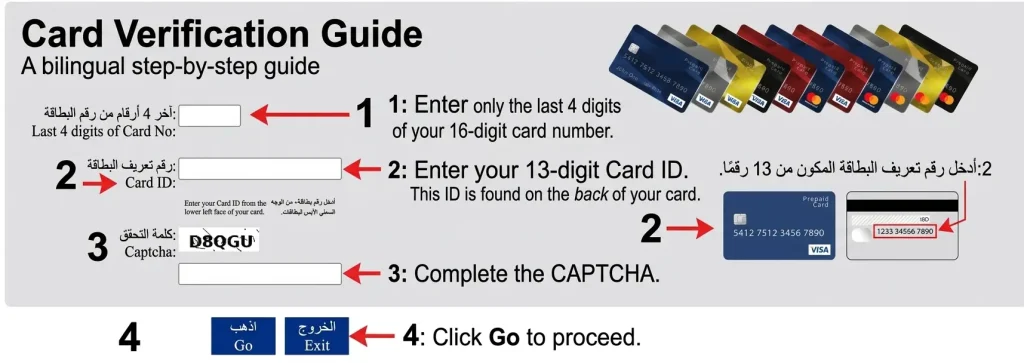
- Enter the last 4 digits of your 16-digit card number
- Enter your 13-digit Card ID found on the back of the card
- Complete the CAPTCHA and click Go
- Your balance and last 10 transactions appear instantly
Why use this method:
- No login or registration needed
- Available 24/7, completely free
- Works on desktop and mobile browser
- Shows recent transaction history instantly
Ratibi Card Balance Check Via FAB Official Website
For a more structured view with full account details, the FAB official website is a solid option.
- Visit the FAB Balance Check official website: https://www.bankfab.com/en-ae/personal/prepaid-cards/ratibi
- Click Login at the top right corner
- Enter your username and password, or click Register if you are new
- Go to Accounts or Cards and select your Ratibi Prepaid Card
- Choose Balance Inquiry, enter the last 2 digits of your card and your Card ID
- Press Go to view your balance and full account details
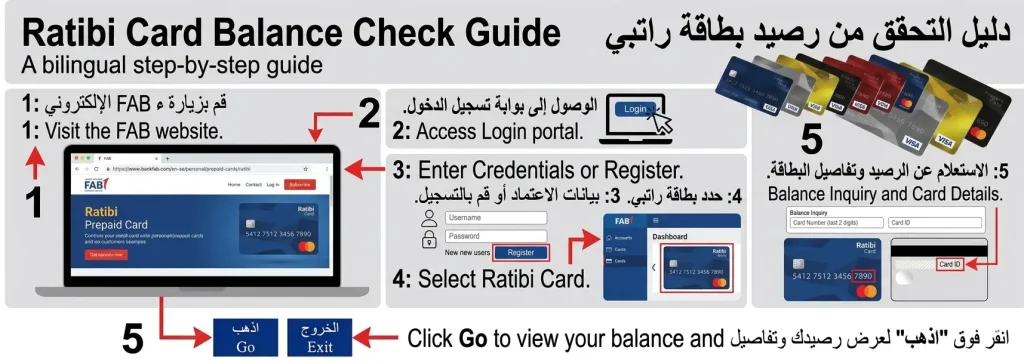
This method works best on a PC or laptop and is secured with FAB’s encrypted connection, keeping your data protected every time you log in.
Ratibi Card Salary Check Through FAB Mobile App
The FAB Mobile App is the most complete card management tool available. It is free to download and carries a 4.1-star rating with 1M+ downloads.
Download
Android
Google Play Store → Search “FAB Mobile”
iPhone
Apple App Store → Search “FAB Mobile”
Huawei
Huawei App Gallery → Search “FAB Mobile”
First-time
- Open the app and tap Register
- Scan your Emirates ID with your phone camera
- Complete the face scan for biometric verification
- Create your username and password
Checking your balance
- Log in using your credentials or biometric login
- Go to the Accounts section
- Select your Ratibi card
- Balance displays instantly on the dashboard
App features
- Instant balance display and transaction history
- Card activation and management
- Bill payment and money transfer
- Salary arrival notifications
Ratibi Card Salary Check Online by Payit App
Payit is the UAE’s first fully featured digital wallet, powered by FAB. It gives Ratibi cardholders real-time balance visibility along with a full financial management suite.
Download:
- Android: Google Play Store → Search “Payit”
- iPhone: Apple App Store → Search “Payit”
Setup steps:
- Open the app and select Ratibi Cardholder
- Scan the back of your Emirates ID
- Enter your Card ID and last 2 digits of your card number
- Provide your mobile number and email address
- Enter the 6-digit OTP received via SMS
- Create a 4-digit PIN for wallet access
- Balance displays in real-time immediately after setup
What you can do with Payit:
- Send money to 200+ countries
- Pay utility bills instantly
- Split bills with friends
- Shop at stores across the UAE
- Access salary advance of up to 50% via money on-demand
Check Ratibi Card Salary By WhatsApp
WhatsApp Banking through FAB is one of the most convenient options for people already using WhatsApp throughout the day.
Setup and use
- Save +971 50 396 6060 to your contacts
- Open WhatsApp and send “Hi” to start
- Complete OTP verification when prompted
- Type “Balance” or select it from the services menu
- Your balance arrives instantly in the chat
Additional services available
- Fund transfers
- Bill payments
- Account inquiries
- Available 24/7
Ratibi Prepaid Card Balance By Sending SMS
When internet access is not available, SMS banking is the most reliable offline fallback. It is free and works within 1 to 3 minutes on any basic mobile phone.
- Make sure your mobile number is registered with FAB
- Compose an SMS: BAL [last 4 digits of card]
- Example:
BAL 5678
- Example:
- Send to 2121
- A reply arrives within seconds showing your current balance
Many users also receive automated SMS alerts the moment their salary is credited, which removes the need to manually check at all.
Ratibi Card Salary Check At ATM
ATM balance checking is the most universally accessible offline method. FAB runs the largest ATM network in the UAE, and using a FAB ATM is always free.
- Insert your Ratibi card into the ATM slot
- Select your preferred language
- Enter your 4-digit PIN
- Choose Balance Inquiry from the menu
- Balance displays on screen instantly
- Option to print a receipt for your records
Note: Using other bank ATMs may carry a small fee. FAB ATMs are always free.
How to Register a Mobile Number For Ratibi Card Salary Check?
Mobile number registration is required for SMS banking, WhatsApp banking, and salary deposit alerts. Without it, several methods above will not work.
Via FAB Mobile App
- Open the app and log in
- Go to Profile Settings → Mobile Number
- Tap Change Mobile Number
- Enter new number and receive an SMS verification code
- Enter the code to confirm — done immediately
Via FAB Online Banking
- Log in and go to Services → Other Services
- Find the mobile number update option
- Follow on-screen instructions and verify with OTP
The entire process takes 2 to 3 minutes. Once registered, you unlock:
- Free salary deposit alerts
- SMS banking access
- Transaction notifications
- WhatsApp banking
FAB Ratibi Card Balance Check Benefits
Financial benefits
- Zero monthly maintenance charges
- No minimum balance required
- Free SMS notifications on every transaction
- Free ATM withdrawals at all FAB machines
- Salary advance of up to 50% via Payit’s money on-demand feature
Security and control
- Chip and PIN technology on every transaction
- Instant card blocking if lost or stolen
- Real-time transaction alerts for unauthorized activity
- No overdraft possible — spend only what is loaded
Speed and convenience
- Instant salary deposits and immediate ATM access
- Bill payments for Etisalat, du, Salik, and Mawaqif process instantly
- International transfers to 200+ countries through Payit
- Accepted at 5,000+ retail stores and all Visa and Mastercard locations globally
- No queues at exchange centers
Free Insurance Coverage
Every Ratibi cardholder receives automatic personal accident insurance at no cost. No application is needed and coverage activates automatically.
| Benefit Type | Coverage Amount |
|---|---|
| Death or Permanent Total Disability | 5× monthly salary (max AED 25,000) |
| Hospitalization (24+ hours) | AED 50/day for up to 30 days (max AED 1,500) |
| Repatriation of Mortal Remains | Up to AED 5,000 actual expenses |
This is one benefit most cardholders do not even realise they have. For workers earning under AED 5,000 monthly without any separate insurance, this built-in coverage carries real value for their families.
FAB Ratibi Card Eligibility Criteria
For employers
- Must hold a corporate account with First Abu Dhabi Bank
- Company must be registered with MOHRE
- WPS compliance is mandatory for private sector businesses
- Employer acts as the single point of contact between FAB and employees
- Responsible for card applications, employee training, and ongoing relationship management
For employees
- Valid UAE residency and residency visa
- Valid Emirates ID
- Monthly salary of AED 5,000 or less
- Complete KYC documents submitted
- Must be employed by a WPS-registered company
Documents Required for Employee and Employer
| For Employers | For Employees |
|---|---|
| Ratibi Application Form | Valid Emirates ID |
| Employee Details Excel Sheet | Labor Card Copy |
| iBanking Application Form | Passport & Visa Copy |
| Company Trade License | Mobile Number |
| Authorized Signatory Details | Email Address |
FAB processes completed applications within 5 to 10 business days. Cards are delivered to the employer’s address and distributed to employees along with usage training.
Ratibi Card Salary Check App Download
FAB Mobile Banking App
- Android: Google Play Store → Search “FAB Mobile” → Download free
- iPhone: Apple App Store → Search “FAB Mobile” → Download free
- Huawei: Huawei App Gallery → Search “FAB Mobile”
- Rating: 4.1 stars | Downloads: 1M+ | Compatible with latest iOS and Android versions
Payit App:
- Android: Google Play Store → Search “Payit” → Download free
- iPhone: Apple App Store → Search “Payit” → Download free
- Functions as a complete digital wallet with all banking features
- Requires WiFi or mobile data | Supports biometric login | Regular updates available
How to Apply for Ratibi Salary Card?
Employees cannot apply individually. The employer must lead the entire process.
- Employer contacts FAB express interest in the Ratibi program at a branch or through customer service
- Account setup employer opens a corporate account if one does not already exist
- Documentation company completes the Ratibi application form and HR prepares the employee details Excel sheet
- Employee information employees submit Emirates ID, labor card, passport, visa copy, mobile number, and email address
- Submission complete package submitted to a FAB branch; processing takes 5 to 10 business days
- Card distribution cards delivered to employer address and distributed to employees with usage training
FAB Ratibi Card Activation
The card must be activated before first use. The FAB Mobile App handles this entirely.
- Download and open the FAB Mobile App
- Tap Already a Customer or Register
- Enter your card or customer number
- Scan your Emirates ID and complete the face scan
- Go to Account Services → Cards and locate your Ratibi card
- Tap Activate, enter your card number, expiry date, and CVV
- Verify details carefully and confirm activation
- Test by checking your balance or making a small purchase
If activation fails, contact FAB customer support directly for assistance.
How to Get Ratibi Card Statement?
Via Magnati PPC Inquiry Portal
- Visit ppc.magnati.com, enter last 2 digits and Card ID, click Go
- View balance and transaction history covering past several months
- Free, 24/7, no login required
Via FAB Mobile App
- Log in → go to Statements or Documents
- Select a specific month or custom date range
- View in-app, download as PDF, or email to yourself
- Covers all transactions, deposits, withdrawals, purchases, bill payments, and fees
Via FAB ATM
- Insert card, enter PIN, select Mini-Statement
- Prints a receipt showing your most recent transactions
Via FAB Branch
- Bring your Ratibi card and Emirates ID
- Request a printed, bank-stamped statement for any date range
- Best for visa applications, loan requests, and official documentation
What is WPS and NON-WPS
Wage Protection System (WPS)
WPS is an electronic salary transfer platform introduced by the UAE government in 2009, managed jointly by MOHRE and the Central Bank to protect employee wages.
How it works
- Employer registers with WPS and opens a corporate account
- Company prepares a Salary Information File (SIF) with all employee wage details
- SIF is submitted to the Central Bank and MOHRE for verification against employment contracts
- Bank issues a payment order through WPS and salaries transfer electronically
- Employees receive SMS and email confirmation
- MOHRE monitors all transactions in real-time and flags any delays immediately
Benefits for employees
- Full salary paid on time, every time
- Wages match employment contract
- Official documentation for easy dispute resolution
- Complete transparency in salary records
Benefits for employers
- UAE labor law compliance
- Protection against false salary claims
- Streamlined payroll with no manual errors
- Reduced administrative costs and stronger business reputation
Non-Wage Protection System (Non-WPS)
Non-WPS refers to salary payments made outside the official WPS platform, typically used for senior management and executives with complex compensation structures.
- Payments made via direct bank transfers to regular accounts
- No salary file submitted to MOHRE or the Central Bank
- Can be paid in UAE dirhams or other currencies
- Handles variable compensation including bonuses and commissions
- Offers more privacy and flexibility for small employee numbers
Important: Most private sector companies must use WPS for the majority of their workforce.
WPS vs Non-WPS Comparison
| Feature | WPS System | Non-WPS System |
|---|---|---|
| Payment Method | Electronic through approved banks | Direct bank transfer |
| Government Monitoring | Yes (MOHRE & Central Bank) | No direct monitoring |
| Suitable For | Most private sector employees | Senior management & executives |
| Salary Records | Tracked & verified by government | Company records only |
| Employee Protection | High – full protection | Based on employment contract |
| Mandatory For | Employees earning ≤ AED 5,000 | Not mandatory for all positions |
| Transparency | Complete | Limited to internal records |
Customer Support and Helpline Numbers
FAB provides 24/7 customer support across multiple channels.
| Support Channel | Contact Details | Availability |
|---|---|---|
| Ratibi Helpline (UAE) | +971 2 499 6279 | 24/7 |
| Ratibi Helpline (International) | +971 4 371 0400 | 24/7 |
| General FAB (UAE) | 600 52 2235 | 24/7 |
| General FAB (International) | +971 2 681 1511 | 24/7 |
| Telephone Banking (UAE) | 600 52 5500 / 600522298 | 24/7 |
| Telephone Banking (International) | +971 2 4996279 | 24/7 |
| Email Support | [email protected] | Business hours |
| WhatsApp Banking | +971 50 396 6060 | 24/7 |
Additional support options
- In-app chat through the FAB Mobile App
- Walk-in visits to any FAB branch during business hours
- FAB Virtual Agent via telephone banking for balance inquiries and card queries
- Online help articles and FAQs
How To Change Mobile Number In FAB Ratibi Card
Via FAB Mobile App (fastest):
- Open the app and log in
- Go to Profile Settings → Mobile Number
- Tap Change Mobile Number
- Enter new number and receive SMS verification code
- Enter code — change takes effect immediately
Via FAB Online Banking:
- Log in → Services → Other Services
- Find the mobile number update option
- Follow on-screen instructions and verify with OTP
Total time: 2 to 3 minutes via either method. Make sure the new number can receive SMS for OTP verification to complete.
Need help? Call +971 2 499 6279 anytime.
How To Transfer Money From Ratibi Card
- Check balance first confirm sufficient funds using any method above
- Choose transfer method:
- Bank transfer (local or international)
- Mobile wallet transfer via Payit
- Transfer to other Ratibi cards
- Enter recipient details full name, account number or IBAN, bank name, and contact information
- Review and confirm check amount and any applicable fees, then authorize with PIN or OTP
- Save your receipt note the transaction reference number, date, amount, and recipient for tracking
Transfer options available:
- FAB Mobile App
- Payit wallet
- FAB branches (in-person)
Benefits of Checking Your Card Salary Regularly
Making balance checks a regular habit protects your finances in three simple ways:
- Budget smarter knowing your balance before spending helps you avoid overspending and manage day-to-day expenses better
- Catch fraud early spotting unauthorized transactions quickly limits the damage and makes dispute resolution faster
- Peace of mind confirming your salary has been credited removes unnecessary stress around payday
Tips for Balance Checking
- Avoid using public WiFi when checking your balance online
- Always log out after every session on the app, website, or Payit
- Use only official apps from Google Play Store or Apple App Store
- Access only official portals like ppc.magnati.com
- Enable two-factor authentication in your app and online banking settings
- Keep all devices updated — security patches protect against known vulnerabilities
Troubleshooting Common Issues
| Issue | Solution |
|---|---|
| Website not opening | Wait a few minutes and retry |
| ATM swallowed card | Visit the nearest FAB branch immediately |
| Forgot login password | Use the Forget PIN link on the app or portal |
| Balance appears incorrect | Contact FAB customer support directly |
For any issue that persists, call +971 2 499 6279 — available 24/7.
FAQs About Ratibi Card Salary Check
Q1: How do I check my Ratibi card salary balance instantly?
The fastest way is through the Magnati PPC Inquiry portal at ppc.magnati.com. Enter your Card ID and the last 2 digits of your card number, click Go, and your balance appears instantly with no login or registration required.
Q2: Can I check my Ratibi card balance without internet?
Yes. You can check your balance offline by visiting any FAB ATM and selecting Balance Inquiry, or by sending an SMS in the format BAL followed by the last 4 digits of your card number to 2121. Both methods are free.
Q3: What is the Card ID on a Ratibi card and where do I find it?
The Card ID is a 13-digit number printed on the back of your Ratibi card, just below the card number. You need it when checking your balance through the Magnati portal, FAB website, or Payit app.
Q4: How long does it take for salary to appear on my Ratibi card?
Salaries are typically credited within 24 to 48 hours after your employer processes payroll through WPS. Weekends and public holidays in the UAE may cause slight delays, so allow an extra day during those periods before contacting support.
Q5: What should I do if my Ratibi card balance is incorrect?
First, cross-check your balance using two different methods such as the Magnati portal and the FAB Mobile App. If the discrepancy remains, contact FAB customer support directly at +971 2 499 6279, available 24/7, and have your Card ID and Emirates ID ready.
Conclusion
Checking your Ratibi card salary is quick, free, and available anytime through six reliable methods. Whether online or offline, the right option is always within reach. Stay on top of your balance regularly to manage spending, catch issues early, and keep your finances fully under control.