FAB Prepaid Card Inquiry: Check your Prepaid Card Easily


 March 23, 2026 9:22 am
Managing your prepaid card should be simple, fast, and reliable, especially when tracking daily expenses. Based on our experience, regularly checking your card details helps avoid unexpected balance issues and improves financial control. A FAB prepaid card inquiry allows users to quickly check balances, review recent transactions, and stay updated on spending activity. This guide provides clear, practical, and secure methods to access your prepaid card details anytime without confusion.
What is the FAB Prepaid Card?
The FAB Prepaid Card is a secure, rechargeable payment card offered by First Abu Dhabi Bank (FAB) that allows customers to make purchases and withdraw cash without having a traditional bank account. Perfect for individuals, corporate salary disbursements, and everyday expenses, these Visa-powered prepaid cards can be used within the UAE and internationally. Spending limits depend on KYC completion, with fully verified users enjoying higher limits of up to AED 50,000 or more.
FAB offers several types of prepaid cards, including:
- FAB Salary (WPS) Prepaid Card: Widely used by employers to disburse salaries under the UAE Wage Protection System
- FAB Gift Card: For gifting purposes at retail and online merchants
- FAB Corporate Prepaid Card: For business expense management
- FAB Travel Prepaid Card: Ideal for international travelers
Each card type has specific features, but the process for making a FAB prepaid card inquiry is broadly similar across all variants.
Why Would You Need to Make a FAB Prepaid Card Inquiry?
There are numerous situations where checking your FAB prepaid card details becomes necessary:
- Checking available balance before a purchase or withdrawal
- Reviewing recent transactions to track spending or verify a payment
- Investigating unauthorized transactions or suspicious activity
- Confirming a salary credit under the WPS system
- Checking card expiry date or card validity
- Resolving a failed transaction at a POS terminal or ATM
- Understanding fee deductions such as maintenance or withdrawal charges
- Activating or blocking a card in case of loss or theft
Methods to Check FAB Prepaid Card
Below are the official methods to perform a FAB prepaid card inquiry.
Method 1: Magnati Website
This website provides simple and straightforward steps to check the FAB prepaid card.
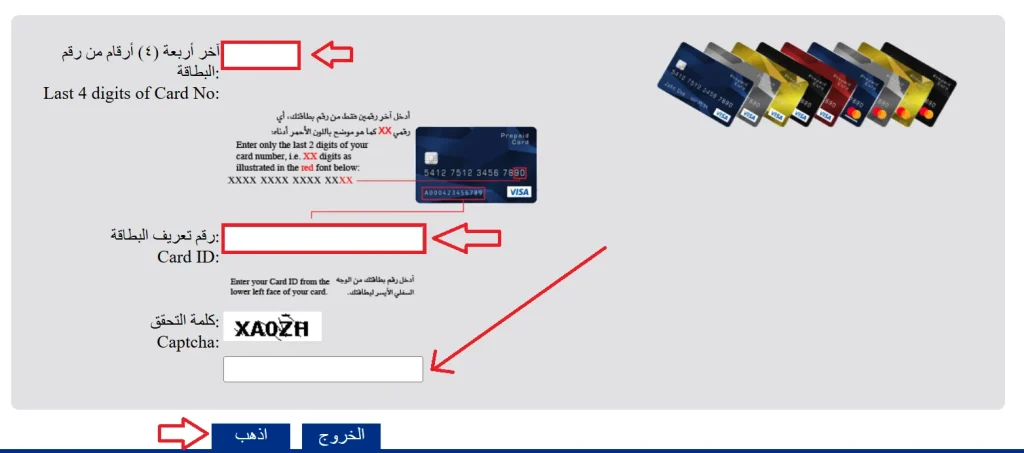
- Visit the official Magnati website: https://ppc.magnati.com/ppc-inquiry/
- Enter the last “4 digits” of your card.
- Enter your “Card ID.”
- Fill out the “CAPTCHA” and click on “GO” and check the FAB prepaid card.
Method 2: FAB Website
The FAB website also provides easy steps to perform a FAB prepaid card enquiry.
- Visit the official FAB website: https://www.bankfab.com/
- Navigate to “Prepaid Card” and select “Balance Inquiry.”
- Enter your prepaid card information in the required field.
- Click on “Submit” to check your FAB prepaid card.
Method 3: FAB Mobile App
The FAB mobile app provides easy steps for users to perform a FAB prepaid card balance check.
- Download the app
- Install the FAB Mobile Banking app from the Google Play Store or Apple App Store.
- Log In to Your Account
- Open the app and log in using your username and password (or biometric login).
- Go to Cards Section
- On the dashboard, tap on the “Cards” option to view all your linked cards.
- Select Your Prepaid Card
- Choose your FAB prepaid card from the list.
- Check Balance & Details
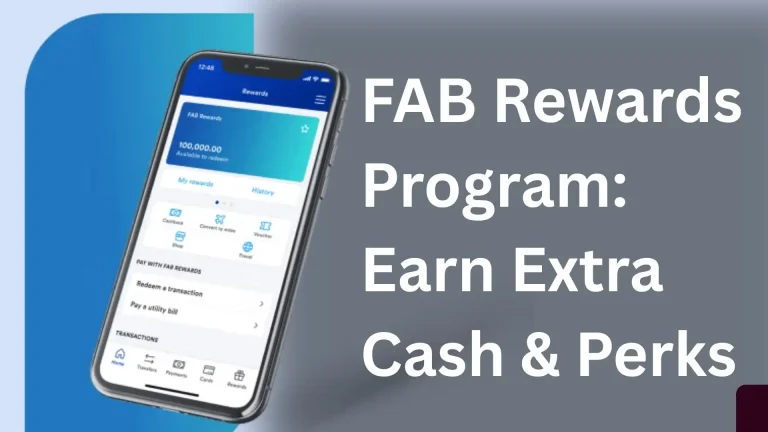
- You can now view your available balance, recent transactions, and spending limits.
Method 4: SMS
You can check your prepaid cards balance even if you aren’t connected to the Internet.
- Register your mobile number with FAB to enable SMS services.
- Send a message in this format: BAL <last 4 digits of your card> to 2121.
- You will receive your prepaid card balance instantly via a reply SMS.
Method 5: FAB Customer Service Helpline
For those who prefer human assistance, the FAB customer care helpline is available for prepaid card inquiries:
- UAE Toll-Free Number: 600 52 5500
- International Number: +971 2 6811511
- Available 24 hours a day, 7 days a week
Method 6: Online ATM Balance Inquiry FAB Prepaid Card
- Go to the nearest ATM that accepts Visa/MasterCard.
- Insert your FAB prepaid card into the machine.
- Enter your PIN associated with the card.
- Select the “Balance Inquiry” or “Check Balance” option.
- Your current card balance will be displayed on the screen.
- You can also choose to print a receipt for your balance if needed.
Method 7: FAB Branch Visit
For complex inquiries, disputes, or situations requiring documentation, visiting a FAB branch in person remains a reliable option. FAB operates an extensive branch network across the UAE.
Bring the following when visiting:
- Your FAB prepaid card
- Original Emirates ID or passport
- Any relevant documents related to your inquiry
Benefits of Using FAB Prepaid Card
- Spend Only What You Load: You can only use the money you put on the card, helping you stay on budget and avoid debt or overspending.
- No Bank Account Required: You don’t need a traditional bank account to get or use the prepaid card — ideal for people without bank accounts or for simple everyday use.
- Easy to Use Everywhere: Accepted for payments at stores, online merchants, and ATMs that support Visa/Mastercard networks (depending on card type).
- Enhanced Security: Chip‑and‑PIN technology and sometimes OTP protection help secure your transactions. Since it’s not linked to your main bank account, your money stays safer if the card is lost.
- Quick and Simple to Get Started: No activation is required for many FAB prepaid cards — once issued and funded, you can start using it immediately.
- No Monthly or Minimum Balance Fees: Many FAB prepaid cards charge no monthly maintenance or minimum balance fees, making them cost‑effective.
- Convenient Reload Options: You can reload the card easily—through online/mobile banking, ATMs, or FAB branches, giving you flexibility and control.
- Helps With Budgeting & Money Control: Prepaid cards make it easy to track and control your daily or monthly spending since you can only spend what’s on the card.
- Good for Travel & Online Payments: Accepted internationally (where applicable), it’s useful for travel or online transactions without needing a credit card.
Common FAB Prepaid Card Inquiry Issues and Solutions
| Issue | Solution |
|---|---|
| Card balance not updating | Wait 24 hours; if unresolved, contact 600 52 5500 |
| Transaction not showing in history | Allow up to 3 business days for processing |
| Forgot PIN | Reset via FAB App or visit a branch |
| Card blocked or frozen | Contact FAB helpline immediately |
| Unrecognized transaction | File a dispute via the app or branch |
| Salary not received on WPS card | Contact HR first; then FAB helpline |
Security Tips for FAB Prepaid Card Users
| Security Tip | Details |
|---|---|
| Keep Your Card Information Private | Never share your card number, PIN, or CVV. Avoid storing card details on unsecured websites or apps. |
| Use Strong and Unique PINs | Choose a 4–6 digit PIN that is hard to guess. Avoid obvious combinations like birthdays, repeated digits, or “1234.” |
| Enable SMS and Email Alerts | Activate notifications for transactions. Immediate alerts help you detect unauthorized activity quickly. |
| Monitor Your Account Regularly | Check your balance and recent transactions via the FAB app or SMS service. Report any suspicious activity immediately to FAB customer support. |
| Use Secure Devices and Networks | Access your account only on trusted devices. Avoid public Wi-Fi for financial transactions; use mobile data or a secured network. |
| Protect Your Mobile and Online Banking Access | Enable biometric login (fingerprint/face ID) on your FAB app. Keep your mobile OS and banking app updated to the latest version. |
| Report Lost or Stolen Cards Immediately | Call FAB immediately if your card is lost or stolen. Request a card block or replacement to prevent misuse. |
| Be Wary of Phishing Scams | FAB will never ask for your full card details, PIN, or password via email, SMS, or phone. Verify links and sender addresses before clicking or sharing information. |
| 9. Limit Card Usage Where Possible | Only use your FAB prepaid card for trusted merchants. Set transaction limits, if available, to reduce risk. |
Source
FAB (https://online.bankfab.com/)
Mahnati (https://ppc.magnati.com/)
FAB Mobile App
SMS
Conclusion
Managing your FAB prepaid card is simple and secure when you regularly check balances and transactions. Using official methods—app, website, SMS, ATM, or branch—ensures control over spending and quick issue resolution. Staying vigilant with security tips maximizes convenience, protects funds, and enhances your overall financial management.